Pages

Showing posts with label creative team. Show all posts

Sunday, November 25, 2018

Alicia Mujica Merry Christmas tube 3


For this tutorial you will need the following:

Paint Shop Pro, I am using PSP X7, you should be able to use any version.

Tube of choice, I am using the artwork of Alicia Mujica,
Merry Christmas Special Edition, which you need a license to use.  

Scrap kit of choice. I am using the matching kit by Alicia Mujica, Merry Christmas

Template 872 by Millie's PSP Madness 

Font of choice, I am using

Plugins: Alien Skin Eye Candy 3.1 glow


Just remember that my choices of papers and elements is just a suggestion, change it up and make it yours! You don't have to follow mine exactly.

Add a drop shadow of your choosing to tubes & elements throughout. I usually use 1, 1, 50, 5 unless otherwise noted.
 

Let's get started!


Open your template, shift D to duplicate and close the original
Make sure you're on the white background layer, make it visible
adjust, canvas size 800x800, flood fill with white
Delete the following layers
Made by millie
word art
Fill the layers with papers, to do this make sure the layer you want to fill has been clicked on in your layer palette. 
Click inside the shape with your magic wand, selections, modify, invert, open your paper, copy and paste as a new layer, 
click delete on your keyboard.
Delete the original template layer

Some layers, like the frames, you may just want to flood fill with a color from your kit. To do this, click on the layer in your layer palette, add another raster layer above it,
click inside the shape with your magic wand, and flood fill it with your color
Delete the original template layer

Fill layers 7 & 6 with paper 2b
fill layers 4 9 with #aa2331
fill layers 2 & 3 wtih #c5a154
fill layer 5 with #cdc4ae
fill layers 1 & 8 with paper 1f 


Copy and paste your tube as a new layer, resize by 35%
arrange in your tag
erase the bits that hang out where you don't want them


now add your elements:

cluster 2 resize 35% arrange across top
reindeer resize 30% then 55% arrange on bottom right
word art resize 25% arrange on bottom left
apply eye candy fat, 7, white then thin 5, #a03f47


crop and resize
add your copyright and credits as needed
add your text and save

Wednesday, November 7, 2018

Alicia Mujica - Merry Christmas 2018


For this tutorial you will need the following:
Paint Shop Pro, I am using PSP X7, you should be able to use any version.
Tube of choice, I am using the artwork of Alicia Mujica, Merry Christmas 2018
Special Edition tube 1, which you need a license to use.  
Scrap kit of choice. I am using Alicia's matching kit, Merry Christmas
Font of choice, I am using Laughing and Smiling
Plugins: eye candy 3, glow
Just remember that my choices of papers and elements is just a suggestion, change it up and make it yours! You don't have to follow mine exactly.
Add a drop shadow of your choosing to tubes & elements throughout. I usually use 1, 1, 50, 5 unless otherwise noted.
Let's get started!
Open a new canvas 900 x 900 pixels with a white background
Open cluster 5, copy and paste as a new layer, resize 35%


Copy and paste your tube as a new layer, resize by 35%
arrange in in front of the cluster
Add the following elements:

tree 5 resize 35% arrange between cluster and tube on left
reindeer resize 25% arrange below the tube layer on left
I then took my eraser tool and erased parts of cluster and tree layers that looked
messy hanging out on the left side

word art 1 resize 20% arrange on bottom left, add Eye candy glow
size 12, fat, white
add it again size 5, color #b1585e, fat
rotate left 20


crop and resize
add your copyright and credits as needed
add your text and save


En Espanol

Para este tutorial necesitarás lo siguiente:


Paint Shop Pro, estoy usando PSP X7, deberías poder usar cualquier versión.


Tubo de elección, estoy usando la obra de Alicia Mujica, Feliz Navidad 2018

Edición especial tubo 1, que necesita una licencia para usar.


Kit de chatarra de elección. Estoy usando el kit a juego de Alicia, Feliz Navidad


Fuente de elección, estoy usando riendo y sonriendo.

Plugins: caramelos de ojos 3, resplandor


Solo recuerda que mi elección de papeles y elementos es solo una sugerencia, cámbiala y hazla tuya. No tienes que seguir la mía exactamente.

Agregue una sombra de su elección a los tubos y elementos a lo largo. Usualmente uso 1, 1, 50, 5 a menos que se indique lo contrario.


¡Empecemos!


Abre un nuevo lienzo de 900 x 900 píxeles con un fondo blanco.
Abra el cluster 5, copie y pegue como una nueva capa, redimensione 35%


Copia y pega tu tubo como una nueva capa, cambia el tamaño en un 35%


acomodar en frente del grupo


Agregue los siguientes elementos:

el árbol 5 cambia el tamaño al 35% organiza entre el grupo y el tubo a la izquierda

el tamaño del reno al 25% se coloca debajo de la capa del tubo a la izquierda

Luego tomé mi herramienta de borrador y borré partes de las capas de clúster y árbol que parecían

desordenado colgando en el lado izquierdo


word art 1 redimensiona 20% organiza en la parte inferior izquierda, agrega un brillo de caramelo de ojos

talla 12, gorda, blanca

añádelo nuevamente tamaño 5, color # b1585e, gordo

girar a la izquierda 20


recortar y redimensionar


agregue sus derechos de autor y créditos según sea necesario


agrega tu texto y guarda

Tuesday, January 2, 2018

Follow Your Heart - Alicia Mujica


New tag using the artwork of Alicia Mujica tube 1 from her special edition Follow Your Heart set

The scrap kit is also by Alicia and has the same name as the tube, Follow Your Heart scrap kit


This forum set uses the same kit and tube 2 from the Follow Your Heart set of tubes.

This tag uses tube 5 from the same set of tubes and the bird is free with a 7.99 euro purchase in her store this month.


Monday, December 4, 2017

Alicia Mujica - December Senses


New tag using the artwork of Alicia Mujica, the tube is December Senses 2017 tube 4 from her special edition pack

The kit is a matching kit with the same name


This snaggable Facebook timeline and avatar use the same scrap kit and another tube from the same special edition pack.


This tag uses the same tube and kit as the one above
This tag uses the same tube (tube 5) from the set, but also uses the scrap kit called Joy by Alicia


This snaggable Facebook timeline uses the same kit, but no tube


Friday, November 17, 2017

Black Friday Special Edition 2017 - Alicia Mujica


Tag using the artwork of Alicia Mujica, the tube is available in her new Black Friday Special edition set
The scrap kit is called I'm Dreaming, it's also by Alicia
The little owl is part of a set of owls that is available free for the month of November 2017 with a purchase of 7euros or more.


This snaggable timeline banner can also be found on my Sinfully Sweet Creations Facebook page.
It's made with the same tube, and the kit used is Alicia's new 2017 kit Joy


Wednesday, October 25, 2017

Nightmare by Alicia Mujica


New tag using the artwork of Alicia Mujica. The tube is Nightmare tube 2 from her pack Nightmare
The scrap kit is Halloween Time 2013


**CT FOR ALICIA MUJICA** New tag using the artwork of Alicia Mujica. The tube is Nightmare tube 2 from her pack Nightmare
 The scrap kit is Halloween Lifestyle


Friday, September 22, 2017

Feel The Magic - Alicia Mujica


**CT FOR ALICIA MUJICA**

New tag using the artwork of Alicia Mujica, the tube is Feel The Magic Special Edition tube 1
The Scrap kit is Taboo Tattoo, also by Alicia


This tag uses the kit Enchanted Forest by Alicia 


Monday, September 4, 2017

Autumn Senses - Alicia Mujica


New tag using the artwork of Alicia Mujica, tube Autumn Senses tube 1 from the Special Edition Set

The scrap kit is also by Alicia, called Autumn Senses


This tag uses only the scrap kit


This tag also uses the Autumn Senses tube, but the scrap kit I used is Autumn Days by Alicia Mujica


Wednesday, August 16, 2017

Sunday, June 25, 2017

Molly - Alicia Mujica


New tag using the artwork of Alicia Mujica. The tube is called Molly 

The scrap kit is also by Alicia Mujica, called 4th Of July 

Monday, May 15, 2017

Alicia Mujica CT - Draco & Lady Dragon


**CT ALICIA MUJICA**

New tag using the artwork of Alicia Mujica. The two tubes I used are 


The scrap kit is also by Alicia Mujica, called Fairytale


Saturday, May 6, 2017

CT Alicia Mujica Spring Special Edition

This tag is made using the artwork of Alicia Mujica,

The scrap kit is a PTU kit from Tiny Turtle Designs
 called Powder Blue Fantasy

Monday, April 24, 2017

Snow White by Alicia Mujica


New tag using the artwork of Alicia Mujica,
The scrap kit is also by Alicia Mujica, called Enchanted forest


This forum set was made with the same tube, no scrap kit


Friday, March 17, 2017

Alicia Mujica Special Edition Sweet Easter tube 2


New tag using the artwork of Alicia Mujica, tube is tube 2 from the Special Edition Sweet Easter set:

Scrap kit is the Big kit B day Easter also by Alicia


The second tag is made using Alicia's scrap kit Sweet Honey Bee


**CT FOR ALICIA MUJICA** New tag using the artwork of Alicia Mujica, the tube is Special Edition Sweet Easter Tube 2: http://aliciamujicadesign.com/es/393-special-edition-sweet-easter-by-alicia-mujica-2017-2017.html The scrap kit is Sweet Honey Bee: http://aliciamujicadesign.com/es/392-kit-sweet-honey-bee-by-alicia-mujica-2017.html You can find my tags and tuts at: http://www.sinfullysweetcreations.blogspot.com


Tuesday, February 28, 2017

Easter - Alicia Mujica tubes


This tag was made using the Artwork of Alicia Mujica,
the tube is Easter 2017 which you can purchase here
the scrap kit is also by Alicia Mujica, called Secret Garden which you can purchase here

This second tag was made with the kit Bday Easter by Alicia Mujica


Thursday, May 21, 2015

Sunday, May 17, 2015

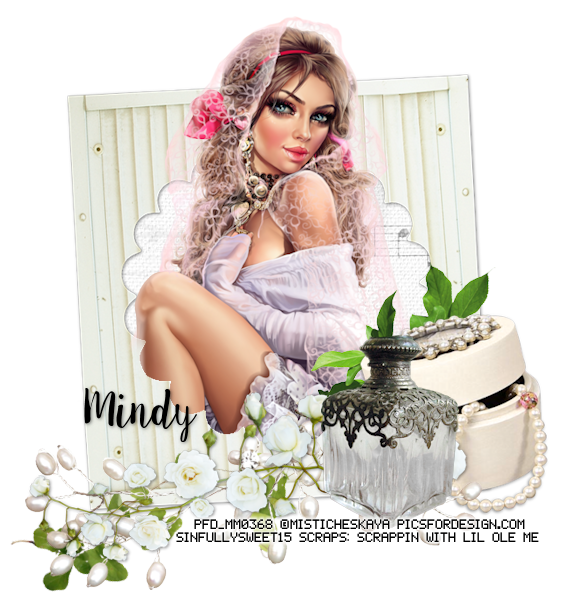
Pure Ivory


Snaggable versions of this tag in my Fotki album

For this tutorial you will need the following:

Paint Shop Pro, I am using PSP X7, you should be able to use any version.

Tube of choice, I am using the artwork of Misticheskaya (Elza tube) which you need a license to use. 

Scrap kit of choice. I am using Pure Ivory, a PTU kit by Scrappin With Lil Ole Me 

Font of choice, I am using Sweet Pea

Plugins: no outside plugins


Just remember that my choices of papers and elements is just a suggestion, change it up and make it yours! You don't have to follow mine exactly.

Add a drop shadow of your choosing to tubes & elements throughout. I usually use 1, 1, 50, 5 unless otherwise noted.


Let's get started!

Open a new canvas 850 x 850 pixels with a white background

Open element 39 copy and paste as a new layer 
click inside with your magic wand, selections, modify, expand 2, selections, invert
open paper 6 copy and paste as a new layer 
click delete on your keyboard,

Copy and paste your tube as a new layer, resize by 50%
arrange in your frame
erase the bits that hang out of your frame where you don't want them
deselect

Now add your elements:
element 112 resize 50% mirror & arrange on bottom right corner
element 111 resize 45% arrange to the left of element 112
element 5 resize 75% arrange below element 111

element 25 mirror & arrange over element 5, erase what hangs below the bottle on the right
element 84 resize 45% mirror & arrange below boxes on right
element 115 resize 65% rotate left 120 & arrange under flowers & beads along the bottom

crop and resize
add your copyright and credits as needed
add your text and save

Sunday, May 10, 2015

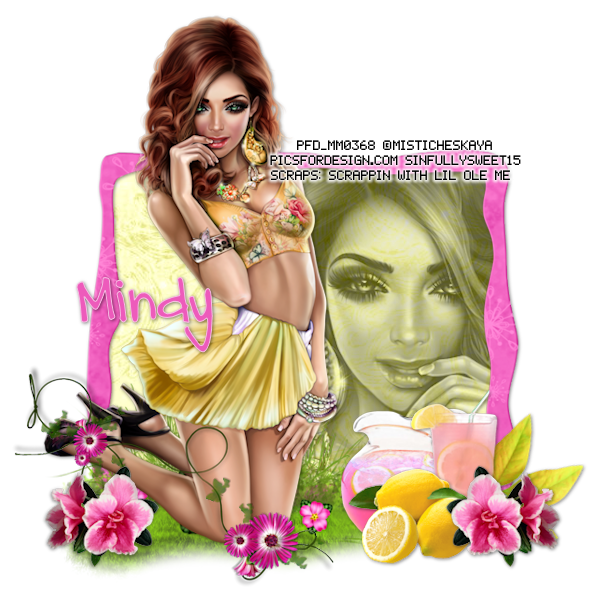
Pink Lemonade


Snaggable versions of this tag in my Fotki album

For this tutorial you will need the following:

Paint Shop Pro, I am using PSP X7, you should be able to use any version.

Tube of choice, I am using the artwork of Misticheskaya (Jenny tube) 
which you need a license to use.  

Scrap kit of choice. I am using Pink Lemonade by Scrappin With Lil Ole Me 

Font of choice, I am using DJB Carly Sue Got Married

Plugins: no outside plugins used


Just remember that my choices of papers and elements is just a suggestion, change it up and make it yours! You don't have to follow mine exactly.

Add a drop shadow of your choosing to tubes & elements throughout. I usually use 1, 1, 50, 5 unless otherwise noted.


Let's get started!

Open a new canvas 850 x 850 pixels with a white background

Open element 123 copy and paste as a new layer, resize 80% 
click inside with your magic wand, selections, modify, expand 2, selections, invert
open paper 5 copy and paste as a new layer 
click delete on your keyboard,

Copy and paste your tube as a new layer, 
arrange in your frame, click delete on your keyboard
change blend mode to Luminance(L) and drop the opacity to 66

Copy and paste your tube as a new layer, resize by 40%, arrange on left side of frame

add the following elements:
element 12 resize 60% arrange below your tube on left
element 29, mirror & resize 45% arrange over your tube on the left
element 2 resize 45% arrange to the right of the grass on the bottom

element 3 resize 45% arrange to the right of the pitcher
element 1 resize 25% arrange in front of pitcher and glass
element 7 resize 25% rotate right 12 arrange behind glass

element 13 resize 19% mirror & arrange to the right of the glass, duplicate & mirror


crop and resize
add your copyright and credits as needed
add your text and save

Sunday, May 3, 2015

Lovin Summer


Snaggable versions of this tag in my Fotki album

For this tutorial you will need the following:

Paint Shop Pro, I am using PSP X7, you should be able to use any version.

Tube of choice, I am using the artwork of Ellie Milk (Sunflower tube) 
which you need a license to use.  

Scrap kit of choice. I am using a PTU kit, Summer Lovin by Scrappin With Lil Ole Me 

Font of choice, I am using Al Kisah

Plugins: no outside plugins


Just remember that my choices of papers and elements is just a suggestion, change it up and make it yours! You don't have to follow mine exactly.

Add a drop shadow of your choosing to tubes & elements throughout. I usually use 1, 1, 50, 5 unless otherwise noted.


Let's get started!

Open a new canvas 850 x 850 pixels with a white background

Copy and paste your tube as a new layer, resize by 35%

add your elements:
element 3 arrange below tube, duplicate about 2 times, arrange around below or in front of tube so it looks like she's laying in the grass

element 26 resize 65% arrange behind tube and grass layers
element 59 resize 45% arrange in front of tube on right side
element 36 resize 35% arrange on right

element 28 resize 75% arrange between grass and fence on left
element 61 resize 25% arrange on fence on the right side
element 60 resize 35% arrange on bottom left
element 62 resize 15% arrange on grass on left side

crop and resize
add your copyright and credits as needed
add your text and save